Best Standing Desks for Heavy-Load Dual-Monitor Setups in 2026
Running two large monitors, a desktop PC, and a spread of peripherals through daily sit-stand cycles puts genuine mechanical stress on a desk frame — yet many reviews skip past what actually happens when you push close to the rated limit. Below we synthesize hands-on findings from across the web so you can separate marketing claims from field-tested reality.
The short version: For the most heavily loaded dual-monitor workstations, the Deskhaus Apex Pro and FlexiSpot E7 Plus lead the reviewer consensus on raw carrying capacity and four-leg stability. The Uplift V2 remains the multi-source premium pick for setups that stay under 355 lbs — Wirecutter calls it their top recommendation after testing more than 25 desks over nearly a decade. Budget-focused buyers get surprisingly close performance from the FlexiSpot E7, while the Autonomous SmartDesk Pro attracts split verdicts once tall users push it toward its height ceiling.
What the reviews agree on
Across hands-on evaluations from DeskLivo, NestNThrive, StandingDeskPicks, and GameRevolution, several themes recur consistently.
- Four-leg construction beats two-leg under load. GameRevolution concludes directly that four legs are more preferable to two because they help limit wobble, especially at taller heights — a finding echoed by DeskLivo's preference for wide, dual-motor configurations. When raised above 45 inches with two monitor arms attached, two-leg frames show measurably more lateral flex.
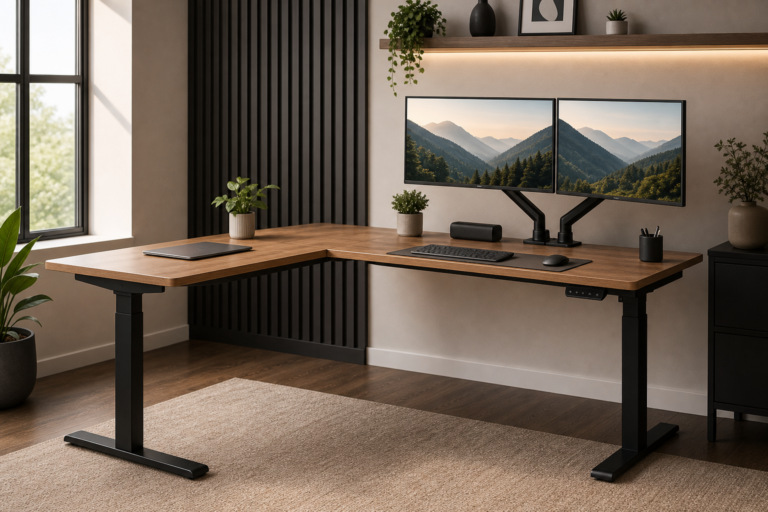
- 300 lbs is the practical capacity floor, not the ceiling. DeskLivo's analysis puts a realistic dual-monitor loadout — two 27-inch displays, a dual arm, keyboard, mouse, and accessories — at roughly 60–80 lbs of combined load. StandingDeskPicks argues the real case for a high weight rating is motor longevity: a motor running at 22% of its rated maximum should outlast one straining at 80% by a meaningful margin.
- Desk width matters as much as weight capacity. The broad consensus sets 60 inches as the sweet spot for dual-monitor setups, with 72 inches preferred if a laptop stand, speakers, or notebook also share the surface. DeskLivo specifically recommends 60- or 72-inch configurations of the FlexiSpot E7 over narrower models for this reason.
- Warranty length signals long-term build confidence. Every source flags the wide range — from five-year coverage on FlexiSpot frames to Uplift's 15-year frame guarantee and Deskhaus's 20-year warranty — as a meaningful indicator of how long manufacturers expect their mechanisms to hold up under regular use.
How the top picks compare
| Desk | Weight Capacity | Leg Config | Starting Price | Warranty | Sourced from |
|---|---|---|---|---|---|
| Deskhaus Apex Pro | Up to 600 lbs | 4-leg | ~$899–$975 | 20 years | StandingDeskTopper, RedditRecs, StandingDeskPicks |
| FlexiSpot E7 Plus | 440 lbs lifting | 4-leg | From $499.99 | 5 years | GameRevolution, StandingDeskPicks |
| Uplift V2 | 355 lbs (2-leg) | 2-leg | From $599 | 15 years | NestNThrive, Wirecutter, StandingDeskPicks, DeskLivo |
| FlexiSpot E7 | 355 lbs | 2-leg | $479 | 5 years | StandingDeskPicks, DeskLivo |
| Autonomous SmartDesk Pro | 310 lbs | 2-leg | ~$499 | 5 years | TechRadar, WorkWhileWalking, DeskLivo |
| Fully Jarvis Bamboo | 350 lbs | 2-leg | $649 | 7 years | StandingDeskPicks |
The contenders: what reviewers actually say
Deskhaus Apex Pro — the heavy-load consensus leader
StandingDeskTopper's hands-on assessment rates the Apex Pro among the sturdiest frames tested, confirming a capacity up to 600 lbs and describing it as maintaining solid structural integrity with minimal wobble even at its 48.5-inch maximum height. Aggregated Reddit owner feedback on RedditRecs reinforces this picture: owners running solid-wood tops, monitor arms, and studio speakers report the frame feels genuinely tank-like, with one six-foot-four owner describing it as rock-solid through years of daily use. Recurring tradeoffs are assembly complexity — RedditRecs users flag unclear instructions and missing hardware — a price landing in the $899–$975 range depending on desktop choice, and a plastic wire-management channel that StandingDeskTopper finds underbuilt relative to the premium metal frame.
FlexiSpot E7 Plus — four-leg muscle at a competitive entry price
GameRevolution awarded the E7 Plus 9 out of 10, stressing that the four-leg design delivers meaningfully better stability above 45 inches under a real workstation load. The motors are described as surprisingly quiet and height transitions as smooth and quick. One practical caveat flagged in the review: the rear frame crossbar sits close to the desktop edge, complicating cable routing for some dual monitor-arm configurations — not a deal-breaker, but worth accounting for when positioning arms. GameRevolution puts the entry price at $499.99; StandingDeskPicks prices a configured unit at $799, a gap that reflects top material and frame-size choices rather than a reporting conflict.
Uplift V2 — the multi-source premium pick with a caveat for heavy loaders
Wirecutter's sustained recommendation for the V2 rests on its customizability, wide height range, and stability built up across nearly a decade of testing. NestNThrive's independent long-term review adds an important nuance: the standard two-leg V2 shows minor wobble at full extension under heavy loads, and the reviewer explicitly advises tall users with loaded workstations to upgrade to the four-leg V2-Commercial frame variant. StandingDeskPicks measures the V2 as the quietest desk in its field tests at 38 decibels — quieter than any rival in this roundup — and confirms the 15-year frame warranty as the longest among two-leg models in this category. Base prices start around $599; NestNThrive's fully specified recommendation runs $799 and above.
FlexiSpot E7 — the value benchmark
StandingDeskPicks' roundup describes the E7 as delivering ninety percent of the Uplift's quality at eighty percent of the price — the clearest value statement in any source covering this category. DeskLivo recommends the 60- or 72-inch version specifically for dual-monitor users, citing its 355-lb capacity and what the site calls “rock-solid dual-motor stability” at wider widths. At $479 it matches the Uplift V2's weight rating while undercutting it by over $100. The five-year warranty is the sharpest concession to that lower price and a meaningful gap from the Uplift's 15-year coverage for anyone planning a decade of use.
Autonomous SmartDesk Pro — value option with a stability ceiling concern
TechRadar describes the SmartDesk Pro as a sleek, professional desk that hits all the key ergonomic features, praising its 26-to-51.6-inch height range and quiet operation. WorkWhileWalking's dedicated testers, however, flag genuine stability concerns at or near full extension under load — characterizing the desk as unstable at maximum height — a verdict absent from TechRadar's evaluation and likely reflecting different test weights or height ranges used during assessment. DeskLivo notes the 310-lb capacity more than covers a typical dual-monitor loadout but flags the 53-inch desktop width as tight for side-by-side screens without a monitor arm. A short power cable requiring an extension cord is a recurring practical complaint across multiple sources.
Fully Jarvis Bamboo — surface appeal, limited heavy-load argument
StandingDeskPicks includes the Fully Jarvis Bamboo in its 2026 roundup for its renewable bamboo top and 350-lb frame, but measures it as the noisiest desk in its field test at 45 decibels — a notable gap from the Uplift V2's 38 dB. At $649 it costs more than both the Uplift V2 base configuration and the FlexiSpot E7 while offering a narrower maximum height range, with a seven-year warranty sitting between the budget and premium tiers. For buyers committed to a bamboo working surface, the Jarvis earns its place; purely on heavy-load dual-monitor specs, the FlexiSpot E7 Plus at a comparable price presents a stronger case.
Where they disagree
The most significant factual conflict concerns the Deskhaus Apex Pro's rated capacity. StandingDeskPicks cites 450 lbs, while StandingDeskTopper and Deskhaus product pages reference figures reaching 600 lbs. The most likely explanation is that different sources are quoting different sub-models — the standard Apex Pro versus the higher-spec Apex Pro Max. Buyers should verify the exact model before relying on a specific capacity figure.
The Autonomous SmartDesk Pro's stability at height produces the sharpest reviewer split in this roundup. TechRadar's evaluation is broadly positive, describing the build as hitting all key benchmarks. WorkWhileWalking's testers characterize it as unstable near its maximum extension under load. The discrepancy likely reflects different test weights, user heights, or the specific height position used during evaluation — and it is a real practical concern for tall users who regularly stand at the desk's upper limit.
There is also a meaningful split on whether the FlexiSpot E7 undercuts the case for the Uplift V2. StandingDeskPicks argues the E7 closes the performance gap enough that Uplift's premium is hard to justify except on warranty length. Wirecutter and NestNThrive take the opposing position, treating Uplift's build tolerances and long-term reliability track record as worth the price difference for anyone keeping a desk for a decade or more. Neither camp is wrong; the answer depends entirely on how long you plan to own the desk.
FAQ
How much weight does a dual-monitor setup actually place on a standing desk?
DeskLivo's analysis puts a realistic dual-monitor workstation — two 27-inch displays, a dual monitor arm, keyboard, mouse, and common accessories — at roughly 60–80 lbs of combined load. Any modern standing desk rated above 150 lbs handles this comfortably. The real argument for a 300-lb-plus rating, as StandingDeskPicks explains, is motor longevity rather than raw load necessity: a mechanism running well below its maximum should outlast one near its limit.
Do I need a four-leg standing desk for a dual-monitor setup?
Not necessarily, but the benefit is real at the upper end of the height range. GameRevolution's comparative testing finds that four-leg designs significantly reduce wobble above 45 inches when a full workstation load is present. For average-height users who keep their desk in the middle of its travel, a well-built two-leg frame like the Uplift V2 or FlexiSpot E7 is typically stable enough. Tall users who regularly stand at the desk's maximum height gain the most from four-leg construction.
What desk width works best for side-by-side monitors?
DeskLivo recommends a minimum of 60 inches for a true dual-monitor configuration with room for a keyboard and mouse. Seventy-two inches becomes worthwhile if you also keep a laptop stand, speakers, or a drawing tablet on the surface alongside both screens. Narrower desks in the 48-to-55-inch range force monitors closer together or require precise arm positioning that can limit viewing angle flexibility.
Is a longer warranty worth the price premium?
StandingDeskPicks treats warranty length as a proxy for how confident a manufacturer is in the frame's long-term durability — which is why Uplift's 15-year and Deskhaus's 20-year guarantees stand out. NestNThrive advises calculating the per-year cost of the premium: spread over a decade of daily use, the extra outlay for significantly longer coverage often amounts to just a few dollars per year, which reframes the decision considerably.
Can I mount a clamp-on monitor arm on all of these desks?
All six desks in this roundup are compatible with standard clamp-style monitor arms. Grommet-mount arms require a pre-drilled through-hole — verify availability and diameter for your specific configuration before ordering. GameRevolution specifically notes that the FlexiSpot E7 Plus's rear frame crossbar sits close to the desktop edge, which can require creative cable management when fitting a dual-arm system, but does not prevent mounting outright.
Sources
- desklivo.com
- nestnthrive.com
- standingdesktopper.com
- standingdeskpicks.com
- gamerevolution.com
- techradar.com
- redditrecs.com
- workwhilewalking.com
Related Articles